

AI 3D Comedy Animation:
A Mosquito Gag Breakdown
For a visual comedy animation, turn a familiar annoyance into one exaggerated, readable action. A mosquito using a shovel is a concrete reference for scale contrast and prop-based humor. Develop your own character and situation, keep contact clear, and test whether viewers understand the joke before adding dialogue or extra effects.
What makes this mosquito setup readable?
The reference frame shows a stylized mosquito in clothing using a shovel against a person's forehead. The caption presents it as a mosquito joke made with AdAnt AI.
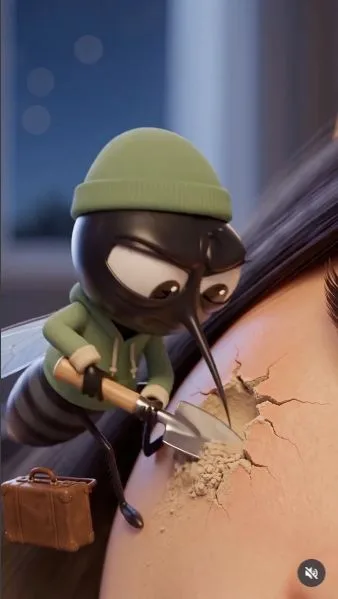
Watch the mosquito animation on Instagram.
The scene translates a familiar irritation into a deliberately absurd physical job. The small character, oversized human surface and recognizable tool create a contrast that can be understood from a single frame. That is our reading of the visual construction, not a measured explanation of reach. The screenshot does not establish the whole sequence, original prompt or cost of producing the clip.
This guide uses the description “stylized character animation.” It does not imply that a particular film studio produced, approved or supplied the characters. When writing a brief, specify the actual materials, proportions, lighting and expression you want instead of relying on a studio name to do all the descriptive work.
Use scale and contact to make the gag convincing
Start with the ordinary experience the audience should recognize. Then choose one exaggerated interpretation. The reference turns an insect's activity into manual labor; a different brief could make a household task absurdly ceremonial or give a tiny object an outsized opinion. Avoid stacking unrelated transformations before the first idea has become clear.
| Design decision | What to specify | What to inspect |
|---|---|---|
| Relative scale | Tiny worker beside a much larger surface | Character size stays stable between shots |
| Tool | A recognizable silhouette | Grip remains attached to the correct hands |
| Contact | Where the action meets the surface | No floating tool or impossible penetration |
| Reaction | A visible response to the action | The response happens after the cause |
These checks apply to the proposed workflow; they are not a claim that the reference failed them. Frame the gag tightly enough for the prop to read on a phone. A wide cinematic background may look attractive while making the important action too small. For a dialogue-based contrast, see the AI skit example.
An original storyboard: a dust bunny cleaning a desk
Create a tiny dust-bunny janitor trying to keep a desk spotless while a human repeatedly drops crumbs. Establish the character and its brush beside a single crumb. Let the human's snack create a new mess immediately after the janitor finishes. End with the janitor placing a tiny barrier around the snack. This is an original proposed storyboard; it is not the mosquito clip's prompt or a proven viral formula.
Lock the desk texture, character scale and brush design in a reference frame. Generate the sweep, falling crumbs and final barrier as manageable shots. Check the brush touching the desk, the direction of the crumbs and the character's reaction. Keep the barrier visually simple so its purpose reads without a written sign. A small sound cue can support contact, but the action should still be understandable muted.
Develop the brief through the Viral Animation Generator, then evaluate the estimate before generating. Describe an original character. Public examples do not establish how many discarded takes a similar output might require, so budget from your actual runs rather than the apparent simplicity of the scene.
Test comprehension before calling the format successful
Show the opening without explanation and ask what problem the character is trying to solve. If viewers name the rendering style but cannot name the conflict, improve the framing or prop before adding more movement. A visual gag has a different job from a demonstration reel: the audience needs a cause and payoff, not just a collection of polished images.
After publishing your own variation, compare retention around the action and payoff, sharing, profile visits and follows where available. A replay may reflect delight, confusion or both; combine the number with qualitative feedback rather than assigning a single meaning to it. Use the same observation period across comparisons and record which variable changed. This reference supplies creative evidence, not verified follower-growth results. The viral content formats guide can help decide whether a recurring visual joke fits the rest of the account.
Frequently asked questions
Is this an official studio animation?
No studio affiliation is established by the source. Describe the visible character design and materials rather than implying an endorsement.
Should a visual gag include dialogue?
Only if it helps the premise. First check that the character’s goal, action and consequence are understandable without speech.
Are the dust-bunny storyboard and source prompt the same?
No. The dust-bunny scene is an original proposed brief, distinct from the mosquito reference. Its performance and cost have not been measured.